
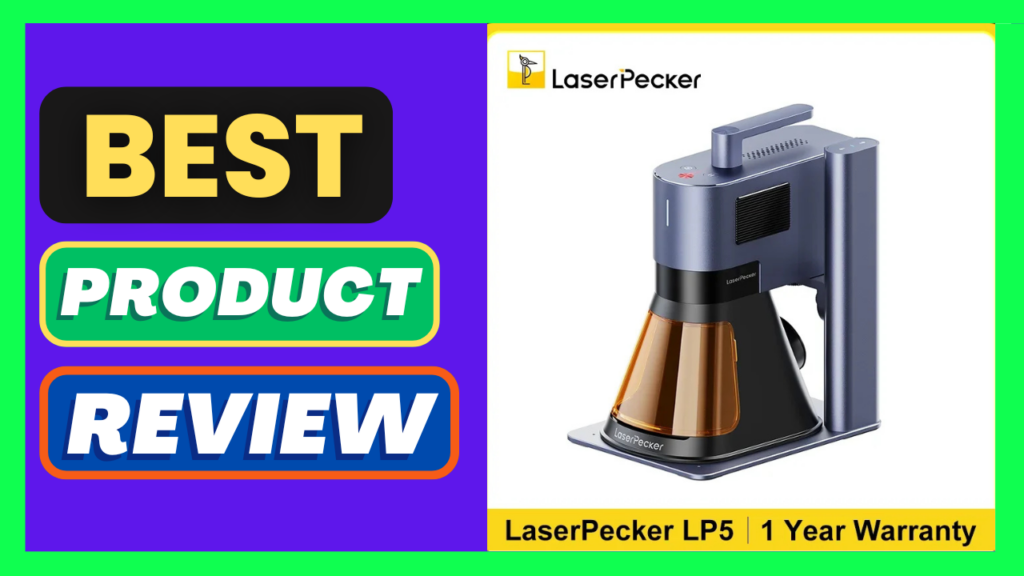
The LaserPecker LP5 20W Dual Laser Engraver is an ambitious desktop laser machine designed for users who want to work with both traditional engraving materials and metals without buying two separate machines.
Its biggest selling point is the combination of a 20W blue diode laser and a 20W fiber laser in one compact system. The diode laser is aimed primarily at materials such as wood, leather, acrylic, slate, and similar non-metal surfaces, while the fiber laser is designed for metal engraving and marking.
That makes the LP5 considerably more versatile than a conventional diode engraver, although its relatively small working area and premium price mean it isn’t the perfect machine for everyone.
Design and Build Quality
The LP5 has a surprisingly compact footprint for a machine with two independent laser sources. It measures approximately 198 × 286 × 323 mm and weighs around 6 kg, making it considerably easier to move or store than many larger laser cutters.
The design is modern and well thought out, with the two laser sources integrated into one machine rather than requiring users to manually swap laser modules.
This is one of the LP5’s biggest conveniences. You can select the appropriate laser in the software and switch between the 450 nm diode and 1064 nm fiber laser without physically changing the laser head.
The overall construction feels more like a premium consumer/prosumer machine than a basic open-frame hobby engraver.
Dual-Laser Performance
The dual-laser configuration is what really separates the LP5 from many competing machines.
The 20W blue diode laser is well suited to wood, leather, acrylic, slate, paper, and other non-metal materials. The 20W fiber laser, meanwhile, handles metals such as stainless steel, aluminum, gold, silver, iron, platinum, and other compatible materials.
This gives the LP5 a remarkable range of applications.
You can use it for personalized wooden signs, leather products, cutting projects, slate decorations, jewelry, metal business cards, tools, promotional products, and detailed metal markings—all from one machine.
Independent testing has also demonstrated its ability to perform detailed metal engraving, deep engraving, embossing, and cutting work.
Engraving Quality
Engraving quality is one of the LP5’s strongest areas.
The machine has a rated engraving accuracy of approximately 0.0027 mm, while independent testing lists laser spot sizes of about 0.08 × 0.1 mm for the diode and 0.06 × 0.06 mm for the fiber laser.
In practical terms, that means the LP5 is capable of producing extremely fine details.
The fiber laser is particularly impressive when working with metal. It can create crisp text, logos, patterns, and high-contrast markings, while the diode laser produces detailed results on materials such as wood and leather.
For people producing personalized products for customers, this level of detail can be a major advantage.
Speed
LaserPecker advertises engraving speeds of up to 10,000 mm/s, which is extremely fast for a compact desktop machine.
Of course, maximum speed isn’t necessarily the speed you’ll use for every project. Material, power, engraving density, image complexity, and desired finish all affect the ideal settings.
Nevertheless, the LP5 is clearly designed with productivity in mind. Its speed becomes especially useful for batch engraving, where shaving time off each individual item can make a significant difference.
Working Area: The Biggest Limitation
The LP5’s main weakness is its relatively small standard engraving area.
The standard working area is approximately 120 × 160 mm, which is perfectly adequate for small products but restrictive for larger signs, panels, artwork, or furniture components.
LaserPecker offers accessories such as a Slide Extension to increase the usable working area, but that adds to the overall cost.
If your main goal is engraving small personalized products, this isn’t a major issue. If you’re planning to work on large wooden signs or larger sheets of material, however, a machine with a larger native work area may be a better choice.
Software and Connectivity
The LP5 supports USB and Wi-Fi connectivity, along with LaserPecker’s software ecosystem. It can also work with LightBurn, which is a significant advantage for more experienced laser users.
The ability to control the machine from a phone is particularly appealing for casual users and small businesses that want a relatively straightforward workflow.
Beginners will appreciate the more guided approach, while experienced users may prefer the additional control offered by LightBurn.
That said, LaserPecker’s ecosystem is still more proprietary than some open-frame laser platforms. Users who enjoy experimenting with hardware and software may find larger conventional machines more flexible.
Portability
Portability is another area where the LP5 stands out.
At roughly 6 kg, it is small enough to move between workspaces relatively easily.
This makes it particularly interesting for small businesses, craft sellers, workshops, and people who don’t have a dedicated laser room.
Optional accessories can make the machine more practical for production work, including rotary and slide extensions, as well as an air purifier and safety enclosure.
Safety
Laser safety should be taken seriously with a machine of this power.
LaserPecker offers a dedicated safety enclosure, and the company describes the enclosed configuration as Class 1 when properly enclosed. The safety enclosure is an optional purchase rather than being included with every LP5 configuration.
For indoor use, I would strongly recommend using the appropriate enclosure and ventilation/filtration setup rather than treating the machine like an ordinary desktop printer.
Users should also follow the manufacturer’s safety instructions and use appropriate eye protection whenever required.
Pros
- Dual 20W diode + fiber laser system
- Excellent metal engraving capability
- Strong performance on wood, leather, acrylic, slate, and other non-metals
- Very high advertised engraving speed
- Excellent fine-detail engraving
- Compact and relatively portable
- No need to manually swap laser modules
- Supports LightBurn
- USB and Wi-Fi connectivity
- Optional rotary and slide extensions
- Suitable for both hobby and small-business applications
Cons
- Relatively small 120 × 160 mm standard work area
- Expensive compared with basic diode engravers
- Useful accessories can significantly increase the total cost
- Safety enclosure is not included with every configuration
- More machine than many casual hobbyists actually need
- Larger projects require an extension or a different machine
Final Verdict
The LaserPecker LP5 is one of the more versatile compact laser engravers available for users who need both metal and non-metal capabilities.
Its dual-laser architecture is the real star of the show. The 20W diode handles materials such as wood and leather, while the 20W fiber laser opens the door to serious metal engraving and marking. That combination gives the LP5 an unusually broad range of applications for a machine this compact.
The main question is whether you need that versatility.
If you’re primarily engraving small products, jewelry, tools, promotional items, personalized gifts, or metal components, the LP5 is a very attractive option. Its compact design and fast workflow are particularly appealing for small businesses.
On the other hand, users who mainly want to cut large sheets of wood or acrylic may get better value from a larger dedicated diode or CO₂ laser. The LP5’s 120 × 160 mm standard work area is simply too small for some projects.
Overall, the LP5 is a powerful, highly versatile, premium desktop laser engraver that trades working area for portability and flexibility.
Rating: 4.5/5
Bottom line: If you want one compact machine capable of engraving both metal and a wide range of non-metal materials, the LaserPecker LP5 is an impressive choice. Its biggest drawbacks are the small working area and the high total cost once essential accessories are added.